EscapeClose Pro3.0
Publisher Description
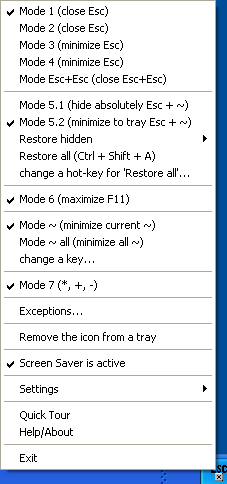
EscapeClose Pro is a tiny utility, allowing you to close or minimize the active window by pressing the Esc button. Or, to work more carefully, it can position the mouse cursor in the upper right-hand corner of the active window, where the Close button is located. You can hide active window. Thus you can see it neither in the TaskBar nor in the Task Manager list (Ctrl+Alt+Del) nor in the list opening by pressing Alt+Tab. And now you can hide active window in the tray. You can use a mask to select files in standard Windows Explorer by pressing the keys *, + and - on the numeric keypad! (like old Norton Commander or Total Commander or FAR). It is especially useful when you are working with dozens of files and folders at once. It has 11 working modes, stays in the system tray, support of exceptions, can maximize or minimize the any active window when the F11 button is pressed (like MS Internet Explorer), can automatically run at Windows startup, can temporally stop the screensaver start (e.g. to watch a movie). Using this program, you will make fewer movements, which will increase the productivity of your work.
About EscapeClose Pro
This Shell Tools program is available in English. It was last updated on 29 September, 2026. EscapeClose Pro is compatible with the following operating systems: Windows.
The company that develops EscapeClose Pro is SaNaPe Software. The latest version released by its developer is 3.0. This version was rated by 1 users of our site and has an average rating of 4.0.
The download we have available for EscapeClose Pro has a file size of N/A. Just click the green Download button above to start the downloading process. The program is listed on our website since 2016-10-02 and was downloaded 557 times. We have already checked if the download link is safe, however for your own protection we recommend that you scan the downloaded software with your antivirus. Your antivirus may detect the EscapeClose Pro as malware if the download link is broken.
How to install EscapeClose Pro on your Windows device:
- Click on the Download button on our website. This will start the download from the website of the developer.
- Once the EscapeClose Pro is downloaded click on it to start the setup process (assuming you are on a desktop computer).
- When the installation is finished you should be able to see and run the program.
Program Details
System requirements
Download information
Pricing
Version History
version 3.0
posted on 2016-10-02
Windows 7 is supported now
version 2.1
posted on 2006-12-01
added the new Modes
